Most investor portal design decisions are made by GP teams, reviewed by IR directors, and evaluated by fund operations leads. The one group whose input rarely shapes these decisions is the LPs themselves. After analysing usage patterns and feedback across 300+ investment firms using Vantage Insight™ — representing thousands of individual LP users — we can tell you with specificity what limited partners actually want from an investor portal.
What LPs Actually Use (And What They Ignore)
73%
of LP portal sessions begin on the performance dashboard — not the document library
41%
68%
Three findings stand out from this data:
- Performance comes first: LPs want to know how their investment is doing before they look for documents. A portal that buries the dashboard under a document library creates friction at the most important moment of the LP’s engagement cycle.
- Event-driven logins dominate: The overwhelming majority of portal logins are triggered by a capital call or distribution notice. This means notification design is as important as portal design.
- Tax documents are the highest-stakes documents: K-1 season is the most operationally sensitive period for LP-GP relationships. Portals that handle K-1 distribution cleanly generate disproportionate satisfaction; portals that handle it badly generate the most LP complaints of any reporting function.
The Three Questions Every LP Is Asking
When an LP logs into your investor portal, they are usually seeking the answer to one of three questions:
- “How is my investment performing?” — They want IRR, TVPI, DPI, and MOIC, updated as of the most recent reporting period, plus committed capital, called capital, distributed capital, and remaining unfunded commitment.
- “Is there anything I need to act on?” — Capital calls require a response. Distribution notices are important. LPs want to see what is pending without having to call you.
- “Where is [specific document]?” — K-1, the last quarterly letter, the subscription agreement, the capital account statement. LPs should never need to email you to find a document they are entitled to access.
A well-designed investor portal answers all three questions within 30 seconds of login, without requiring navigation through complex menu structures.
Document Access vs. Performance Visibility
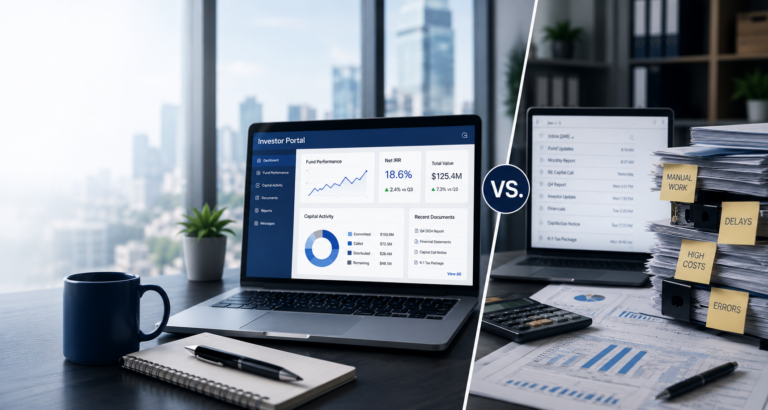
There is a common design mistake in investor portals that prioritises document management over performance visibility. From an LP’s perspective, documents are a hygiene factor — important when they’re missing, invisible when they’re present. Performance visibility is an engagement factor — it drives satisfaction, reduces anxiety, and creates the context for your GP communications to land positively.
The practical implication: your investor portal’s default landing view should be a performance dashboard, not a document list.
“The best investor portals feel like a Bloomberg terminal built specifically for your fund — you log in, you know exactly where you stand, and you can find anything you need in under a minute.”
What LP Frustration Actually Costs
- Increased IR query volume: An LP who cannot find their K-1 in the portal calls your IR team. Each of these is an IR team-hour consumed by a problem that should not exist.
- Reduced LPAC meeting quality: LPs who arrive at advisory board meetings without clarity on their own position tend to ask more basic questions, consuming meeting time.
- Re-up friction: The decision to re-invest in your next fund is shaped by the cumulative experience of the current fund relationship.
Design Principles of a High-Engagement Portal
- Performance-first default view: IRR, TVPI, DPI, MOIC, and capital account summary visible immediately on login — no clicks required.
- Event-driven notification design: Capital calls and distributions trigger immediate notifications with one-click access to the relevant document and action required.
- Zero-click document access: Every LP should be able to find any entitled document within two clicks from the dashboard.
- Mobile-first responsiveness: A significant portion of LP portal sessions happen on mobile — especially for distribution and capital call notifications.
- Brand consistency: The portal should look like it belongs to your firm, not to your software vendor.
The LP Experience Checklist
- Does the LP land on a performance dashboard — not a document library — on login?
- Are IRR, TVPI, DPI, and MOIC visible without navigation or scrolling?
- Does the portal send automated notifications for capital calls, distributions, and new documents?
- Can an LP find their most recent K-1 within two clicks of logging in?
- Is the portal fully functional on mobile without a dedicated app installation?
- Does the portal reflect your firm’s branding — not the software vendor’s?
- Is the LP’s committed, called, distributed, and unfunded balance visible on the dashboard?
- Does the portal confirm document delivery, so you have an audit trail?